


Do you consider your LinkedIn profile as your digital resume? But it is more than this. It can be used as your digital business card or personal brand hub. Your LinkedIn profile is one of the first places recruiters, employers, clients, collaborators, and decision-makers will evaluate you.
Though this platform has well over one billion users, most profiles fail to grab the attention of recruiters and clients because they are incomplete, poorly optimized, or lacking a clear value proposition. That means having a profile on LinkedIn never guarantees you a steady and promising career. Then what do you need to make your profile strong, visible, and complete?
This guide is your complete LinkedIn profile optimization checklist! Whether you are seeking a new position, building a personal brand, freelancing, or trying to achieve a long-term goal, this checklist will help you create a robust LinkedIn profile.
After all, an incomplete profile costs you opportunities you may never even know existed. Therefore, try to make your profile complete and relevant.
#1 Profile Photo and Banner Image
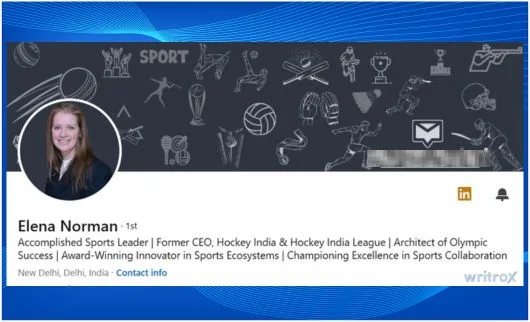
Your profile photo or business banner is the first visual impression people get when they land on your page. So, they matter more than you imagine.
Choose a high-resolution professional picture that you can set as your profile photo on LinkedIn. Your face must be clearly visible with a decent and clean background. Avoid poor-quality selfies, old photos, group photos, logos, or cropped images that can reduce credibility.
If you are using the banner of your brand, keep the size of the banner space at 1584 × 396 px, which is ideal for LinkedIn branding real estate. This would be useful to reinforce your niche, profession, or value proposition.
Checklist:
- Is your profile photo current and professional?
- Is your banner relevant to your profession or brand?
#2 Headline — Your Most Valuable 220 Characters
The headline on your LinkedIn profile is one of the crucial factors in creating a complete profile that can easily attract recruiters and clients. It is one of the important parts of your LinkedIn profile optimization strategy because it has a strong influence on both first impressions and LinkedIn search visibility.
Do not just write your job title; express your value proposition with correct keywords. Include primary keywords that recruiters of your industry generally look for.
The right formula is:
[Role] | [Outcome You Deliver] | [Niche/Industry]
When writing your headline, include terms that match your expertise, target audience, and industry niche.
Checklist:
- Does your headline go beyond your job title?
- Does it include relevant search keywords?
#3 About Section — Tell Your Story, Not Your Resume
The About section in your LinkedIn profile is the space to showcase your personality, expertise, and positioning all together. This section is not just to copy-paste your resume. It is the zone to tell your story in the most genuine and impressive manner.
A good structure is:
Who you are → What you do → Who you help → Key results/achievements → CTA
Since the first 2-3 lines will remain visible before the ‘see more’ link, make sure they are compelling. Have an opening line with a strong hook that makes someone want to keep reading.
Use natural language and industry-specific keywords, and avoid a third-person tone in the About Section. Try to use a conversational tone to make the readers feel comfortable and convinced.
Checklist:
- Is your opening hook strong enough to stop a scroll?
- Have you included a clear CTA?
- Are your keywords naturally woven in?
#4 Experience Section — Results, Not Responsibilities
One of the biggest mistakes professionals make during LinkedIn profile optimization is listing responsibilities instead of achievements.
This section should not just list what you have done; instead, use it to showcase your contributions and achievements in previous roles.
Whenever possible, quantify your achievements. Numbers make your profile more credible and easier to evaluate. For example, mention how you have increased the organic traffic for a client’s website by 140% in 8 months or how you have managed a ₹50L annual ad budget across multiple campaigns.
Instead of using only words to describe your achievements, add LinkedIn media features, such as decks, case studies, portfolio links, presentations, videos, articles, or published work.
Checklist:
- Are all key roles fully filled out?
- Have you used numbers and results where possible?
- Have you added supporting media?
#5 Skills, Endorsements, and Recommendations
LinkedIn uses its users’ skills as a ranking parameter in search. This simply means your profile is more likely to appear when your listed skills match with recruiters’ preferences.
LinkedIn offers you a chance to list up to 50 skills. Use that space wisely and choose the top 3 skills that are highly relevant to your job preferences, industry, and the latest job- hunting keyword trends.
Try to include a blend of technical, industry-specific, and strategic skills as part of your LinkedIn profile optimization process. You can request endorsements from your previous recruiters, employers, colleagues, and present clients to reinforce your primary strength and social skills.
Try to include at least 3 genuine recommendations or written testimonials from colleagues, clients, and managers. Their words can help you build trust.
Checklist:
- Have you pinned down your top 3 most relevant skills?
- Do you have at least three written recommendations?
#6 Education, Certifications, and Featured Section
Ensure that your education section is filled with all relevant academic qualifications, institutes, and formal degrees. Even senior professionals should be careful about mentioning their educational qualifications and degrees clearly.
Next, add certifications that strengthen your professional positioning. You can mention online courses, industry credentials, and technical certifications to make your LinkedIn profile optimization method strong and effective. Do not ignore the features section. Use it to showcase the strongest areas of your career, including articles, case studies, media coverage, portfolios, and project presentations.
Checklist:
- Is your education section complete?
- Have you added relevant certifications?
- Are you using the Featured section strategically?
#7 Custom URL, Contact Info, and Open to Work Settings
Keep your LinkedIn URL short, simple, and clean. A customized LinkedIn URL must look professional as well, with a format like:
linkedin.com/in/yourname
Try to remove random numbers or signs to keep the URL clean and your profile easy to share.
Add enough and authentic contact information on your profile as part of your LinkedIn profile optimization process. Clearly mention your email ID, phone number, and company URL.
Turn on the “Open to Work” option if you are seeking a job. Use the Providing Services when you are working as a freelancer or individual service provider.
Checklist:
- Have you customized your LinkedIn URL?
- Is your contact info current?
- Are your visibility settings aligned with your goals?
#8 Activity and Content — Staying Visible
Even after creating a fully optimized profile, professionals may not be visible on LinkedIn due to a lack of content and activities. Stay active regularly. Post or share content. React, comment, or share posts relevant to your industry or job positioning.
Consistent engagement with relevant posts always helps your profile stay visible on LinkedIn. That does not mean you need to post every day. Even a comment, a share, or a reaction can help your profile to stay active and engaged, which will keep your visibility higher than others.
LinkedIn always appreciates and rewards profiles that share insights, case studies, lessons, and opinions from their daily work. You can also consider publishing LinkedIn articles to share long-form SEO content that can support authority and industry knowledge.
Checklist:
- Are you posting consistently?
- Are you engaging with your network regularly?
Final Checklist Recap and Next Steps
Here is your quick LinkedIn profile optimization checklist:
- Update your profile photo and banner.
- Rewrite your headline with keywords and value.
- Improve your About section with a story and a CTA.
- Turn your experience into measurable achievements.
- Add relevant skills, endorsements, and recommendations.
- Complete education, certifications, and Featured.
- Clean up your URL, contact info, and settings.
- Stay active through content and engagement.
A well-optimized profile can help you to remain relevant and visible on the LinkedIn landscape and grab the best job opportunities. Audit it today while the next opportunity is still ahead of you.
Need help with your personal brand or LinkedIn SEO strategy? Writrox can help you create a good LinkedIn profile with a robust resume. Let’s connect.
FAQs
- How often should I update my LinkedIn profile to stay relevant?
Typically, it should be done every 3-4 months. However, whenever you gain a new role, certification, achievement, or major project, you can update your profile.
2. What is the ideal length for a LinkedIn About section?
It should be 3 to 4 short paragraphs with a clear explanation of your value as a professional.
3. Does LinkedIn profile optimization really help with recruiter visibility?
Yes, LinkedIn profile optimization improves your chances of appearing in recruiter searches and makes your profile more compelling when viewed.
4. How many skills should I add to my LinkedIn profile for maximum reach?
LinkedIn officially allows users to add up to 50 skills. You can add as many relevant skills as possible with that number. Choose the top 3 skills to make your profile relevant for recruiters.
5. Can I optimize my LinkedIn profile even if I’m not actively job hunting?
Yes, you can. Rather, you should. This is because LinkedIn is also valuable for networking, credibility, partnerships, personal branding, and future opportunities.